Overview
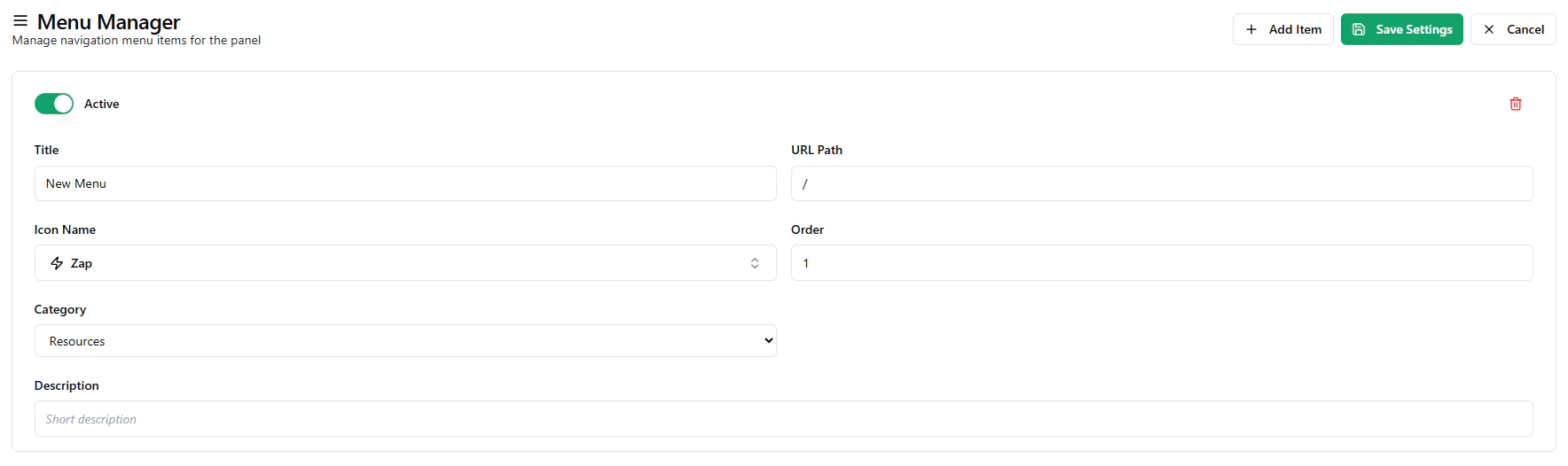
The Menu Manager allows you to create and manage navigation menus that appear on your platform’s landing page header. It gives you full control over how links, pages, and resources are organized and presented to users.
This feature is especially useful for structuring your white-label website navigation.
What You Can Do
Using the Menu Manager, you can:
- create new navigation menu items
- organize menus into categories
- control the order of menu display
- link internal or external pages
- customize menu labels and icons
This helps you build a clear and structured navigation experience for your users.
Menus are typically grouped into primary categories such as:
You can assign each menu item to a category, allowing you to organize related links under a common section in the header navigation.
Each menu item can be customized with:
- a title (display name)
- a URL path (internal or external link)
- an icon for better visual representation
- a description (optional)
This allows you to design navigation that matches your platform’s branding and usability.
Ordering and Visibility
You can define the order of menu items to control how they appear in the navigation bar. Lower order values typically appear first.
Menu items can also be enabled or disabled, giving you flexibility to show or hide links without deleting them.
Use Cases
Menu Manager can be used to:
- add links to your blog or documentation
- link to external websites or resources
- create navigation for contact pages or support pages
- organize product or feature pages
- build structured landing page menus
Why This Page Matters
Navigation plays a key role in user experience. The Menu Manager ensures that users can easily access important pages and resources from your landing page.
Summary
The Menu Manager helps you create and organize navigation menus for your platform, allowing you to structure links, categorize items, and control how users navigate your website. Last modified on May 18, 2026